

Studio: images and video in your dashboard with a personal library
Create images and videos right in your dashboard with GPT Image, Gemini, Seedream, Veo 3.1, Seedance 2.0 and more, plus an Animate button and a 30-day library.
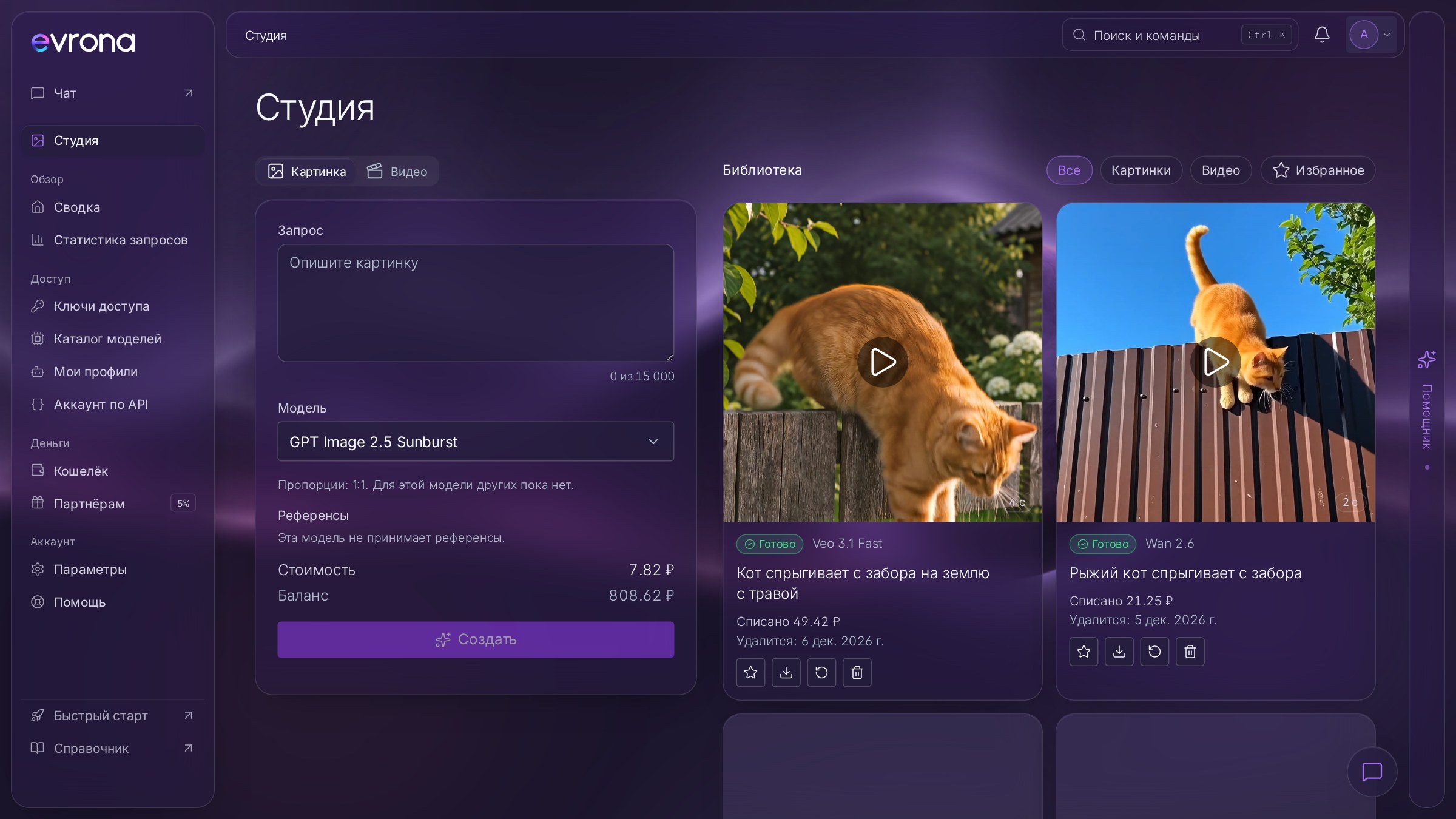
Your dashboard now has a studio: create images and videos right in the browser, no API or code required. Everything you generate is saved to your personal library, and a finished image can be turned into a video with one click.
What the studio is
The studio is the "Studio" section in your dashboard menu. Write a prompt, pick a model and start the generation; the result appears in the library next to the form. It's paid from the same balance as your API requests, with no subscription.
Images
The studio brings together models for creating and editing images: GPT Image, Gemini, Grok Imagine, Seedream, Qwen Image, FLUX, Ideogram, Wan and others from the catalog.
Aspect ratios. Square 1:1 works with every model, and some models also offer 16:9, 9:16, 4:3 and 3:4.
Editing from a reference. Upload your own PNG, JPEG or WebP image up to 5 MB and describe what to change. This works with models that support editing. Uploaded files aren't stored: they're used for that one run only.
Price before you start. The studio shows the cost before each run. For token-priced models it's an estimate, and you're charged the actual amount.
Video
Videos can be made from text or from an image. Available models are Veo 3.1 Fast, Veo 3.1, Seedance 2.0 Fast, Seedance 2.0 and Wan 2.6, with clips from 2 to 8 seconds depending on the model. Videos are generated without sound for now.
Pricing is per second of video: the form shows the per-second price of the selected model and the total for the whole clip.
Animate an image
Every finished image card has an "Animate" button. It opens the video form with that image already set as the first frame, so all that's left is to describe the motion and start. Veo 3.1 and Seedance 2.0 support a first frame, and the studio automatically lists only the models and durations that fit.
Use as a reference
The "Use as reference" button sends an image on to your next step:
"To the image form": as a reference for a new edit, without uploading the file again;
"To the video form": as a style or character reference for a clip. This works with Veo 3.1 models, which accept up to three references.
One good frame can become a whole series: edit the image, animate it, try a different style, all without downloading files or switching between services.
Your personal library
Every studio result is saved to your library:
kept for 30 days from creation, then deleted automatically;
Favorites are kept with no time limit, up to 500 items;
filters for images, videos and favorites;
every item has "Download", "Repeat with the same options" and "Delete" buttons.
Up to four generations can run at the same time. If a generation fails, the reserved amount is returned to your balance.
What about the API?
The same models are available through POST /v1/images/generations and POST /v1/videos/generations, including image input for video. Unlike the studio, API requests aren't saved. Details are in the API docs.
Get started
Sign in to your dashboard or create an account, then top up your balance.
Open "Studio" in the menu.
Choose "Image" or "Video", write a prompt and start.
Like a frame? Click "Animate" and turn it into a clip.